You finished your essay. You’re pretty sure it’s good. But you used ChatGPT for a few ideas, cleaned up a sentence or two with Gemini, and maybe ran the whole thing through a grammar tool. Now you’re staring at the “Submit” button, wondering how much of this looks like a machine wrote it.
That’s the exact problem EduBrain’s AI detector is built for.
Paste your text in. Get a percentage back. Know where you stand before your professor does.
It’s a genuinely useful tool, and it’s free to start. But it works better when you understand what it’s actually doing under the hood and where it can lead you wrong.
What the tool does
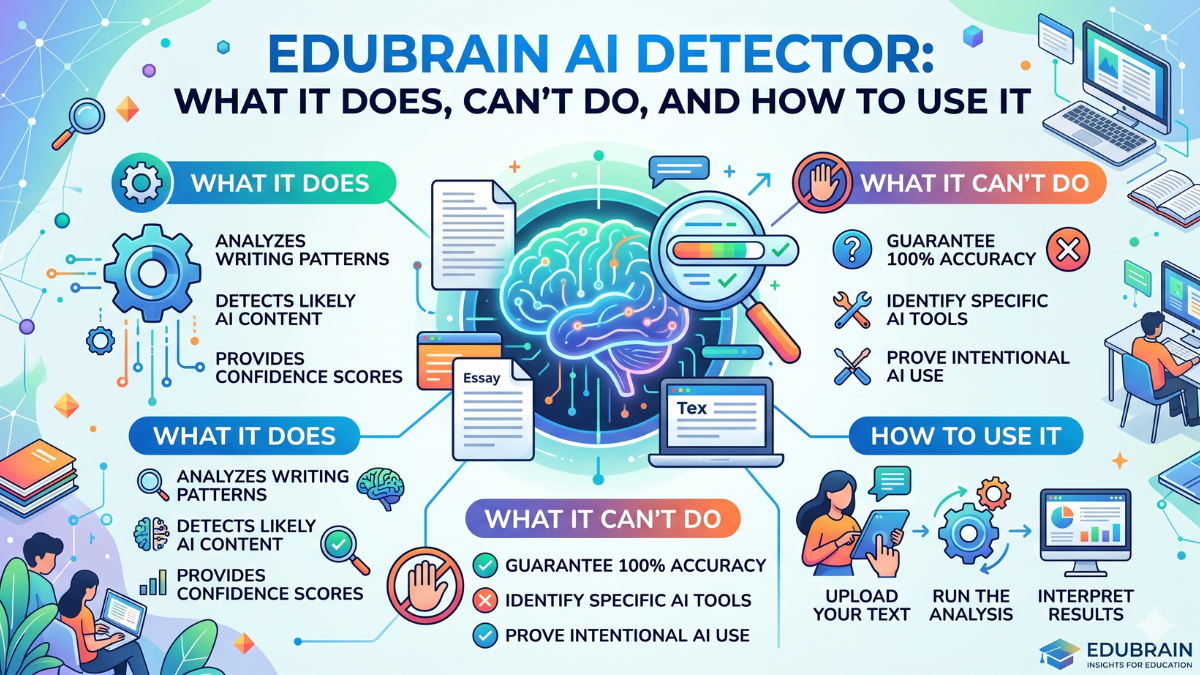
The detector scans your text and returns a single number: the percentage of content it thinks was AI-generated. It can handle ChatGPT, GPT-4, Gemini, and other major models. You paste or upload your document, hit the button, and the highlighted results show you exactly which parts look suspicious.
The key features are real, not marketing copy. Multi-language support across 20+ languages. No data storage (your content doesn’t get saved or shared). A clean interface that doesn’t require a tutorial to use. And a 99% accuracy claim backed by internal testing.
That last number deserves some scrutiny. Not because EduBrain is being dishonest, but because accuracy claims across the whole industry need context.
The false positive problem nobody talks about plainly enough
Accuracy in AI detection ranges from 65% to 90%, depending on the tool, and false positives are a documented, recurring problem. That’s not a fringe opinion. That’s the current state of the field.
Here’s a concrete example of what that means in practice. A PhD student had her thesis introduction flagged as 67% AI-generated by her university’s detection system. She wrote every word herself over four months, with no AI tools, no grammar checkers, not even spell check. She spent two weeks rewriting sections to lower the score. The rewritten version was worse than the original.
The bias is steepest for non-native English writers. Research reports a mean false positive rate of 61.3% for TOEFL essays written by Chinese students, compared with 5.1% for essays from US students in the same setup. Why? Because concise, grammatically careful writing can look a lot like AI output to a pattern-matching algorithm. If you write formally and precisely because English is your second language, a detector may read that as synthetic.
Washington State University terminated its Turnitin AI detection contract in February 2026 after 1,485 false positives in a single semester. Their memo put it plainly: suspicion from a detector is not enough for punishment.
None of this means AI detectors are useless. It means they’re probabilistic tools, not verdict machines. EduBrain is honest about this in their FAQ, saying the results “provide guidance but cannot replace your editing.”
Who actually needs this tool
Three groups get the most out of it.
Students who used AI as a drafting aid. If ChatGPT helped you brainstorm or restructure, but you did the actual writing, you still want to know how the output reads to a detector before submitting. Running your draft through EduBrain gives you that preview. You can see which sentences got flagged, revise them, and check again.
Writers who want to verify that their own work reads as human. Ironically, professional writers with very clean, structured prose sometimes scan as AI. If you know you’re a precise writer, it’s worth checking before your editor or client runs it through their own tool.
Educators who want a first-pass signal. Teachers can use EduBrain to flag work that warrants a conversation. That’s the right frame: a conversation starter, not evidence of cheating. AI detection scores are not definitive proof of misconduct. A high score should prompt a discussion, not a penalty.
How to use it well
The tool is only as good as how you use it.
Paste complete text, not fragments. For best results, make sure the text is complete, since partial documents reduce accuracy. Short paragraphs and sentence fragments push false positive rates up.
If it flags something, look at which parts got highlighted before rewriting everything. Sometimes it’s one paragraph with an overly mechanical structure. Sometimes it’s a transition sentence that sounds like a template. Fixing those 2 or 3 sentences usually moves the score more than a full rewrite.
Don’t use a single scan as your final answer. Running the same text through multiple tools before drawing conclusions is the smarter approach. EduBrain also pairs with their AI Humanizer if you want to rework flagged sections directly.
If your institution has a specific policy on AI use, check that first. EduBrain can tell you what your text looks like to a detector. It can’t interpret your department’s honor code for you.
The bigger picture
AI detectors are chasing a moving target. Models get better. Writing patterns shift. What looked distinctly AI in 2023 looks a lot more like thoughtful human prose in 2026. The gap between human and machine output keeps narrowing, which puts real pressure on detection accuracy.
That’s why a tool like EduBrain works best as part of a process, not as a one-and-done check. Write something real, scan it, see where it lands, and revise what feels off. The goal is writing that sounds like you. The detector just tells you how close you are.
The free version gives you enough scans to understand your own writing habits. Premium opens it up fully, including the Humanizer and the full suite of academic tools.
For students trying to stay on the right side of an AI policy while still using AI responsibly, that’s a pretty useful thing to have in your corner.